

Stop being the gluebetween your apps.
The weekly report. The inbox triage. The client prep. Build a worker once — it handles the job from now on. AI reads the messy parts; the workflow runs the same way, every time.
Build it once.
It runs from now on.
No code. No YAML. No maintenance. If you can use a spreadsheet, you can build a worker.
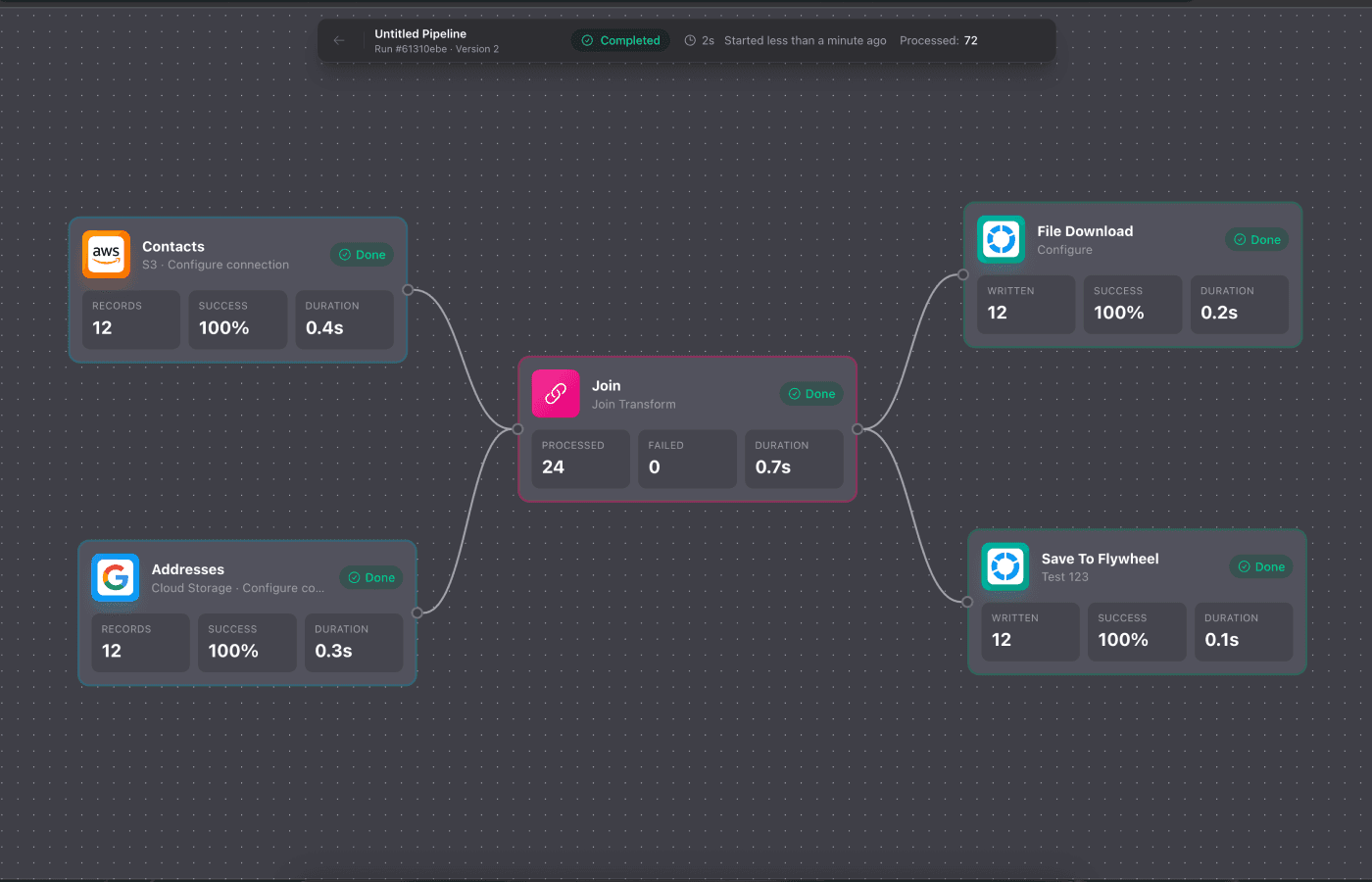
Build it on a canvas
Drag sources, AI steps, and destinations onto a visual canvas and connect them. See your whole worker at a glance.
AI reads the messy parts
Emails, PDFs, Slack messages — AI extracts what matters, summarizes it, and turns it into clean, structured data.
It runs from now on
On a schedule, on demand, via webhook, or triggered by an event. Same input, same output. No hallucinations in your logic.

The job someone does today.
The worker you build instead.
“Generate the weekly report”
Pulls sales data → AI summarizes the trends → delivers a PDF to your inbox every Monday.
“Triage my inbox”
Gmail → AI sorts urgent / FYI / action → routes each to the right Slack channel and task list.
“Prep my client notes”
Reads journal entries → AI extracts themes and red flags → summary in your inbox before each session.
“What are competitors doing on X?”
Scans X → AI identifies patterns and highlights → daily digest delivered to Slack.
“Send the monthly board update”
Pulls metrics from three sources → AI writes the narrative → emails the formatted report.
“Cross-post my content”
New post → AI adapts it for each platform → queued to X, LinkedIn, and your newsletter.
Other tools give you a list.
We give you the work.
Open the canvas and it's not just a diagram. Widget cards show the live stats, reports, charts, and action queues your workers are producing — right now.
It's where you build your workers and where you run your operation. No other automation tool gives you that.
If you're the one
doing it by hand
Built for individuals first — not procurement committees. Free to start, no demo call required.
Knowledge workers
Stop forwarding emails and copy-pasting between apps. Build a worker that routes it for you.
Power users
You’ve outgrown Zapier. You don’t want to learn Python. Real data ops, no code.
Creators
Write once, post everywhere. AI adapts your post for each platform automatically.
Coaches
AI reads their journals and logs. You walk into every session already knowing what happened.
Freelancers
That thing you do every week for clients — the report, the update? Build a worker for it.
Data & technical teams
Visual ETL that reads unstructured data too. Schemas, joins, dedup — plus AI enrichment.
AI agents guess.
Flywheel runs the same way, every time.
AI where you need intelligence. Deterministic logic where you need reliability.
Zapier & Make
Great for API-to-API. But they need perfectly structured data — they can't read your inbox and pull the invoice amount out of an email.
Pure AI agents
Let the LLM handle everything. Great for one-off, exploratory tasks — but they guess, they hallucinate, and you can't audit a production workflow that runs daily.
Flywheel
AI reads your messy, unstructured data — then deterministic workflows route and deliver it. Same input, same output, every run. The smarts of an agent with the reliability of a pipeline.
One plan. $9.99.
No tiers. No per-task fees. No surprises. Start free and upgrade when you're ready.
Free
No credit card. Not a trial.
- 30 executions/month
- All features included
- Every provider & template
- Visual canvas + AI enrichment
Paid
Or $99/year — two months free.
- Unlimited executions
- All features included
- Bring your own LLM keys (no markup)
- Cancel anytime
Less than a coffee a week. Automate your whole week for $9.99.
We run Flywheel on Flywheel.
Our own support triage, bug-fix PRs, and marketing run as Flywheel workers. AI agents catch edge cases, write tests, open PRs, and ship. Content gets drafted, scheduled, and cross-posted — all workflows.
If we can't replace a support rep, a junior dev, and a marketing coordinator with our own product, it doesn't ship. So we prove it works by using it.
Frequently Asked
Questions
Everything you need to know about Flywheel
What is Flywheel?
You know that recurring task someone does every week — the report, the daily digest, the client prep, the data routing? Flywheel lets you build a workflow (we call it a "worker") that does it automatically. You build it once on a visual canvas, and it handles the job from there — on a schedule, on demand, or triggered by an event. AI reads the messy parts (emails, PDFs, messages), and deterministic workflows handle the rest reliably.
How is this different from Zapier?
Zapier connects APIs — when X happens, do Y — and needs structured data. When 85% of your data lives in emails, Slack, and PDFs, you need AI to read it. Flywheel structures that messy data with AI, then runs the same reliable workflow every time. Plus your whole worker is right there on the canvas, not hidden behind menus.
How is this different from AI agents?
AI agents guess. Flywheel workers execute. We use AI for understanding your data, then deterministic logic for routing and transforming it. Same result every time — no hallucinations in your business logic, no surprises. Agents are great for exploratory one-off tasks; Flywheel is for production workflows that run daily.
Do I need technical skills?
No. The visual canvas is drag-and-drop. Connect a source, add an AI step, connect a destination. No code, no YAML, no deployment pipelines. If you can use a spreadsheet, you can build a worker.
What is the "live canvas" everyone mentions?
The canvas isn't just where you build — it's where you run your operation. Widget cards show live stats, reports, charts, and action queues from your running workers. Open the canvas and you see what your workers are producing, not just the workflow graph.
How much does it cost?
Free to start — 30 executions a month, all features, no credit card. When you need more it's $9.99/month for unlimited executions (or $99/year). One plan, no tiers, no per-task fees. Bring your own LLM keys and we don't mark up AI costs.
How long does it take to set up?
Most workers take under 10 minutes. Drag a source, add an AI step, connect a destination, hit run. No onboarding calls, no implementation projects.
What data sources do you support?
Gmail, Google Drive, S3, BigQuery, GCS, DynamoDB, Firestore, PostgreSQL, Pub/Sub, Slack, X, HubSpot, and more shipping regularly. If you need something we don't have yet, let us know.
Can I use Flywheel alongside my other tools?
Yes. Use Zapier for simple API triggers. Use AI agents for research. Use Flywheel for workflows that need AI understanding plus reliable execution. They complement each other.
Stop doing it by hand.
Build the worker.
Free to start. No credit card. Automate your first task in under 10 minutes.